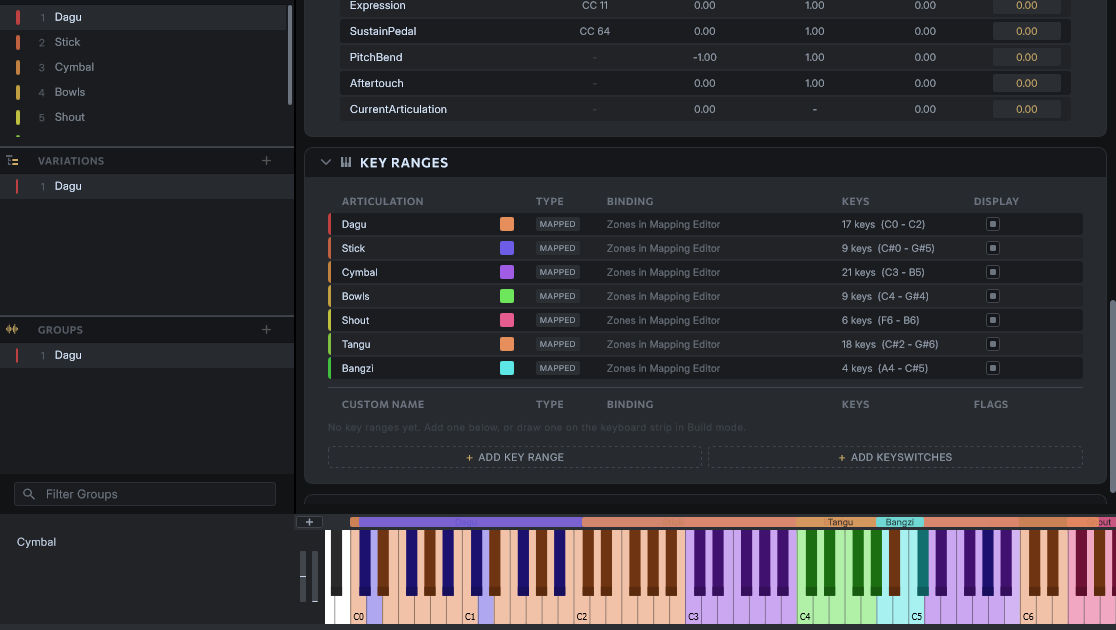

Can you explain how to show key colors for different groups in the play interface? For example, in the edit interface I set different colors for different groups, but when I switch back to the play interface, it only shows the key colors for the first group.Thanks!
Hello!
Great question. From your screenshot, it looks like the ranges are auto-generated “mapped” ranges for each articulation. These are designed to be displayed only when that Articulation is active.
Obviously for your percussion library this wouldn’t make sense, so at the moment the alternative is actually to click “Add Key Range,” essentially duplicating the ones that are listed here, copying the colors, names, and tooltips. Custom key ranges are global for the whole instrument, so they should appear without needing the articulation to be “selected.”
That being said, this is an area where the UI still needs improvement. Ideally, there will be a way to easily convert the “Mapped” key ranges here so that they always display. Maybe this can be the default behavior when your instrument’s note distribution mode is set to “pass through.” We will have a look at that.
Thanks!
Steven
OK,Thanks!I have a try