FR: Ability to set UI Properties in FIGMA - PER Instance, and not only on Components

Currently if i need to create 20 same looking knobs on my GUI, i cannot just duplicate the instance, since i need to edit the exposed parameter name on the main component.

If the visual design of the knob changes later (a routine, expected part of iterating on a plugin GUI, not an edge case), there is no supported way to propagate that change. Each of the 20 duplicates needs to be edited individually.

This is deal-breaking for me when designing. The whole point and benefit of using Figma as a handoff would be to be able to use it to prototype incredibly quickly.

I think a simple solution would be to add a checkbox on the main component “allow duplicates” And in this mode each instance would get an incremental parameter value exposed to KODA. (slider_1, slider_2 etc.)

Alternate idea: Figma already lets you rename individual instances natively. KODA could use that — since it already knows by instance ID that it’s the same component, it could read the instance’s own (renamed) layer name and use that as the Parameter, falling back to the component’s Parameter property if the instance hasn’t been renamed. Everything else (artwork, spritesheet, dimensions) would stay linked to the main component as normal. This would need no new UI at all, and reuses a workflow designers already do by habit.
And also better than solution 1, since if i remove or reorder knobs, the automated parameter names will be de-synced every time, needing to relink in KODA.

Thanks

Hi @dobanym , thanks for the feedback!

The problem you’re describing is completely valid, and it’s something we’ve wrestled with quite a lot. Our Figma documentation is not quite finished and doesn’t include a lot of this information, so I’ll do my best to explain this here.

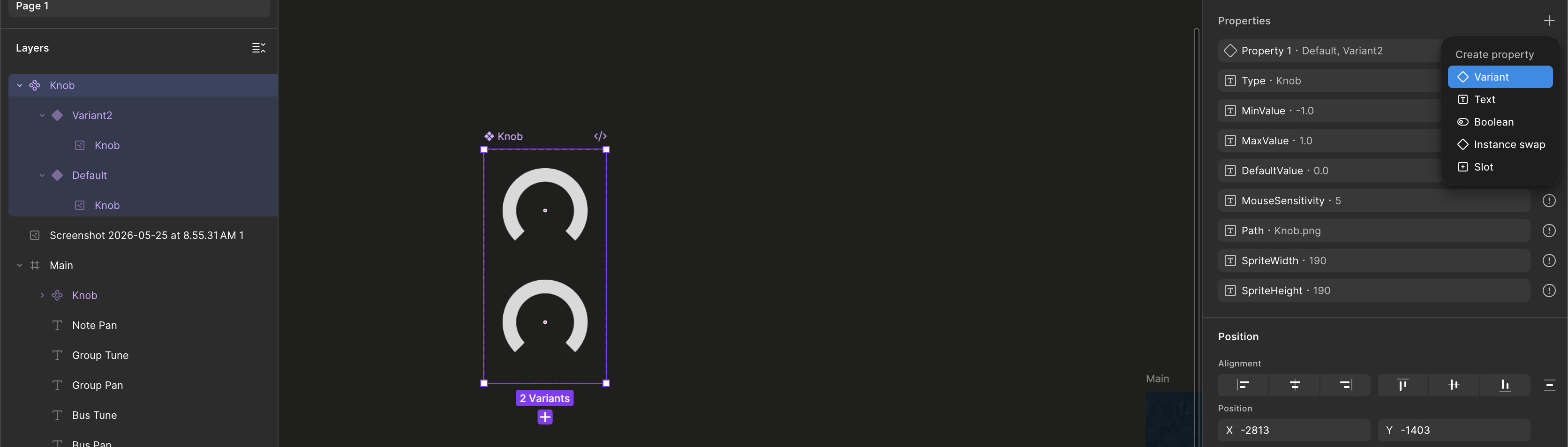
Also apologies if this is stuff you already know, but to start off in Figma, you can add “variants” to a component:

When you do this, the set of properties for the component still live on the top-level component:

All of the variants “inherit” the properties of their parent component just like an instance does, however for values that need to be unique to each variant you can add a “variant property.” “Property 1” is a variant property that is added automatically when first created. You will notice that variant properties become part of the name of the variant automatically:

To link each one to a different parameter, we can either create a new “Parameter” property or just rename “Property 1” to “Parameter.” Be sure that if there is already a “Parameter” property, you remove it first before adding it as a Variant property.

Next, you can click the icon next to it to set the values of all the variants in one place, so if you know you need 10 knobs you can add them all and then change their Parameters from here afterwards:

From here, you can add however many variants you need, each routed to a separate parameter:

Once you’ve made all of the duplicates you need and set them to different Parameters, you can drag each variant out from the component set into the “Main” frame.

A component that contains variants is called a “component set”, and one nice thing about a component set is that all of the variants inherit their properties from the component set (“Knob”, with the 4 diamonds icon), with only the “Parameter” property being different. You can do this with other properties as well, like if you need a different min/max/default value for some variants.

Figma has some quirks when it comes to components and their limitations. They don’t make it easy to copy a component (you have to use a plugin or open the console and call a clone() function with the component selected), and instances cannot have properties independent of the source component.

The system isn’t perfect, and doesn’t quite gel with our KODA Properties plugin, so we’ll be looking at ways to make this easier to do without directly modifying the properties in this way.

Oh also remember that a component instance can go inside of another component. So if you need to be able to change the design in one place and have it affect multiple components, that is a (probably simpler) option as well.

Hey Steven!

Thanks for the detailed answer!
Fortunately i know Figma like the back of my hand, so this was easy to follow, and your last post was the key, i have nested a my main knob component inside a component set, and i only need to duplicate and name the properties, when i change the main component, all of them update on the design, with the added benefit that i can re-render the knob spritesheet from the original knob, and only need to update it once on the component set.

This is also good if i want to reuse the same look-and-feel of the main knob but assign different values, i just create a new set with different data.

This is a good enough workaround, thank you.

(but i secretly prefer my idea of simply renaming the instances, the solution is there for free - it would not destroy the current behavior if you keep the names intact- and this way you don’t need to create duplicates in your component set, one less unnecessary step is always good in my book for the long run)

btw LOVE that the GUI rerfeshes in real-time. SUCH a time saver.

Matt